Collaborative VR: The Game-Changer for Plant Engineering & EPCM Projects

Why Traditional Plant Design Reviews Aren’t Enough

Global plant engineering projects—across chemical, pharmaceutical, and oil & gas industries—require precise coordination between teams spread across continents. Traditional workflows relying on 2D model reviews and in-person meetings often struggle to deliver the required spatial clarity, speed, and alignment.


Common challenges for engineering, procurement, and construction management (EPCM) include:

  • Difficulty visualizing complex plant layouts on flat screens

  • Delays in catching integration issues, such as clashes between disciplines

  • High travel costs and scheduling bottlenecks for stakeholder meetings

  • Risk of errors during construction due to inadequate training and limited site familiarity

  • Constructions costs can increase by 11% due to design changes, errors, and ommissions


What Sets Modern Collaborative VR Apart

Today’s most effective virtual reality collaboration platforms solve these problems by offering:

  • Instant, browser-based access—no downloads or plugins, just join from anywhere

  • One-click sharing for immersive sessions with any number of participants, regardless of device

  • Direct CAD model import from leading engineering design tools, without manual file conversions

  • Real-time model interaction—hide, isolate, annotate, or highlight plant components on demand

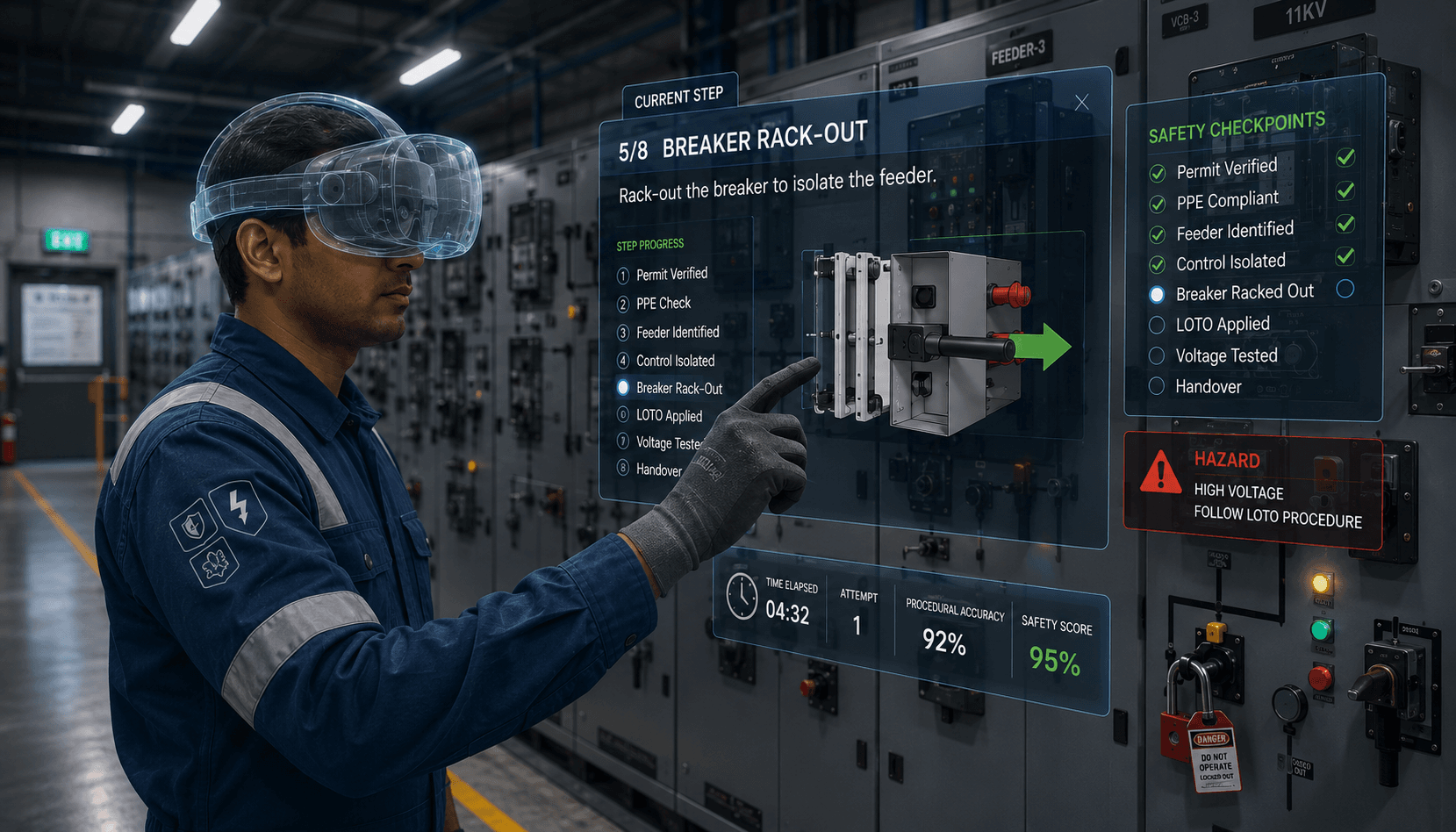
  • Integrated VR training modules so contractors and site staff can rehearse assembly steps and safety protocols virtually


Case Study: Global Plant Project, Real Results

A leading engineering firm deployed immersive VR collaboration for a major plant project, connecting 10 team members across two countries and four cities—all within a browser-based, interactive 3D environment.

The impact:

  • 24% reduction in total project effort

  • 36% cut in travel costs

  • Accelerated identification and resolution of design issues before construction

  • Safer, better-prepared construction teams thanks to interactive, scenario-based VR training

Early detection of layout conflicts (like cable tray routing and operational clearances) led to faster, more confident decision-making and minimized costly rework.


Endorsement from Industry Leaders

Don’t just take our word for it—see how industry innovators are using collaborative VR to transform project delivery. Check out this real-world success story from Arya Engineers & Contractors Pvt. Ltd., who leveraged immersive engineering reviews and remote collaboration to streamline a recent EPCM project:


Read the Arya Engineers LinkedIn Post

“The use of immersive collaborative VR helped our teams reduce travel, improve coordination, and ensure a higher quality handover to our client.”
— Arya Engineers & Contractors Pvt. Ltd.


The Future of Plant Design: Immersive, Browser-Based, and Secure

Not all VR solutions are created equal. The most effective platforms for engineering and EPCM projects feature:

  • Zero-install, device-agnostic access (PC, Mac, VR/MR headsets)

  • Unlimited participation with robust security and privacy controls

  • Real-time and asynchronous collaboration tools, including markup and voice annotation

  • Hands-on VR training capabilities to improve jobsite readiness and safety

By embracing these innovations, engineering teams can reduce project risk, save costs, and accelerate timelines—delivering better outcomes for all stakeholders.


Schedule a live demo or speak with our solution experts.

Beyond Game Engines: A Simpler Way to Create Immersive 3D Training

🚀 Introduction: Why Immersive Training Needs a Simpler Future

Immersive 3D training is reshaping how organizations prepare their workforce—especially in fields like automotive, energy, and manufacturing.
Yet, many companies still rely on game-engine-based tools (like Unity, Unreal Engine, or derivative authoring platforms) that require deep technical expertise, long development cycles, and complex deployment pipelines.


iQ3Connect takes a different approach.

Our web-based, no-code platform lets trainers, instructional designers, and subject-matter experts build and deploy immersive 3D training modules—directly from a browser—no coding or game-engine skills required.


In short: immersive training creation should be as easy as building a slide deck, and now it is.

🎮 The Traditional Path: Game Engines and Their Offshoots


1. High Barriers to Entry

Game engines were originally built for entertainment and gaming, not enterprise learning.
Even products “simplified” on top of these engines still depend on complex underpinnings that require:

  • Developers skilled in scripting and 3D asset management

  • Device-specific optimization for VR, AR, PC, and mobile

  • Dedicated teams to build, test, and deploy new versions

That means longer timelines, higher costs, and ongoing dependency on specialized talent.


2. Complex Deployment

Most game-engine-based platforms require packaging training experiences as stand-alone applications, with separate builds for each device or OS.
This creates friction:

  • Installers and updates on each headset or PC

  • IT bottlenecks for distribution and maintenance

  • Limited scalability across large or distributed teams

When training content changes—say, a new maintenance step or safety regulation—those updates must be rebuilt, re-tested, and re-deployed.


3. Maintenance and Version Control Challenges

Each new version of the software or hardware SDK can break compatibility, requiring updates to your content pipeline. Over time, organizations end up maintaining multiple versions of the same module just to keep pace with device changes—draining time and resources.

🌐 The iQ3Connect Approach: Simplicity Through the Web


1. No-Code Authoring for SMEs and Trainers

With iQ3Connect, anyone—not just developers—can create immersive, instructionally accurate training modules.
All you need is a browser.
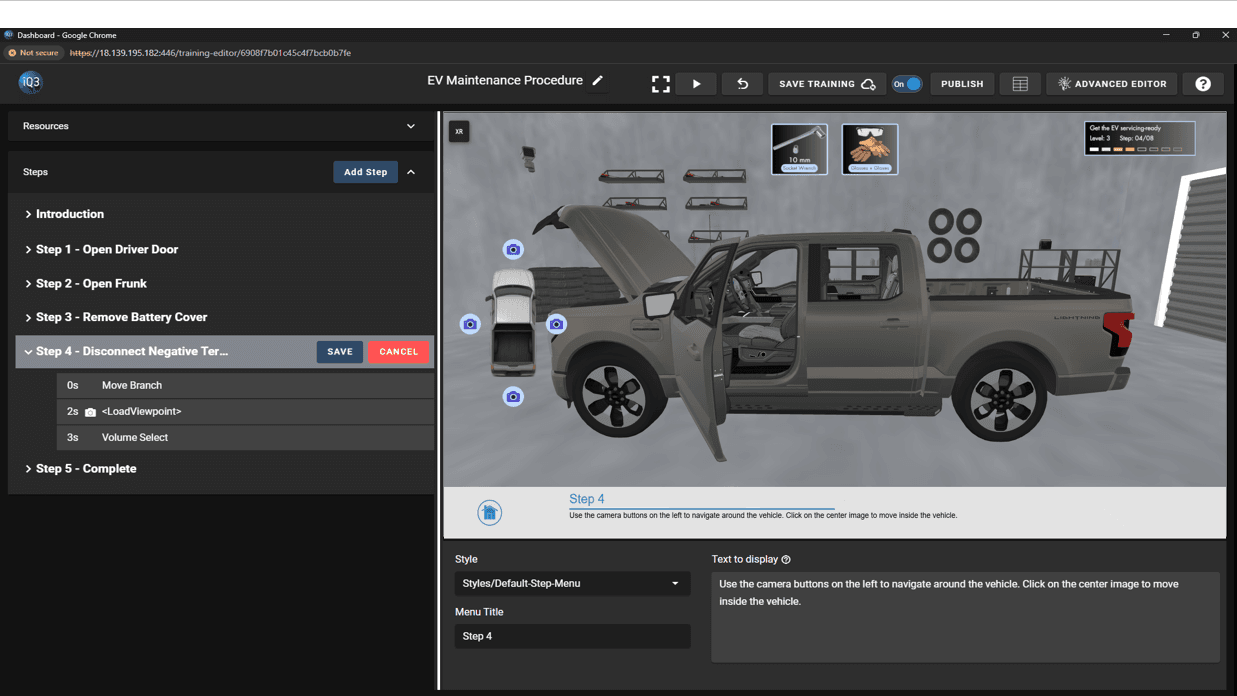
Drag-and-drop objects, define steps, and build 3D learning flows in minutes—no engine, no installs, no code.

“Customized and instructionally-accurate training modules can be built quickly and instantly deployed to any VR, AR, PC, tablet, or mobile device—all through a web browser.”


2. Instant Web Deployment

Once built, your immersive training is live—instantly accessible through a secure web link.
Learners simply click and launch on any device: headset, tablet, laptop, or phone.
There’s no need for app packaging, store submission, or IT setup.


3. Rapid Updates & Iteration

Need to change a procedure or add new instructions?
Edit it directly in-browser and republish—no re-coding or rebuilding required.
Your global workforce always accesses the most current version of the training, automatically.


⚡ Game-Engine-Based Tools vs iQ3Connect: The Key Differences

FeatureGame-Engine-Based ToolsiQ3Connect Platform
Ease of UseRequires developers, coding, asset workflowsNo-code, browser-based authoring
Time to DeployWeeks or monthsMinutes
Device SupportSeparate builds per headset/deviceUniversal browser access
MaintenanceFrequent rebuilds and updatesInstant updates, one version for all
ScalabilityLimited by IT and device logisticsGlobal web scalability
Total Cost of OwnershipHigh (licenses, dev time, maintenance)Low (cloud-based, self-service)

🔧 Example: Building an EV Maintenance Module in Minutes


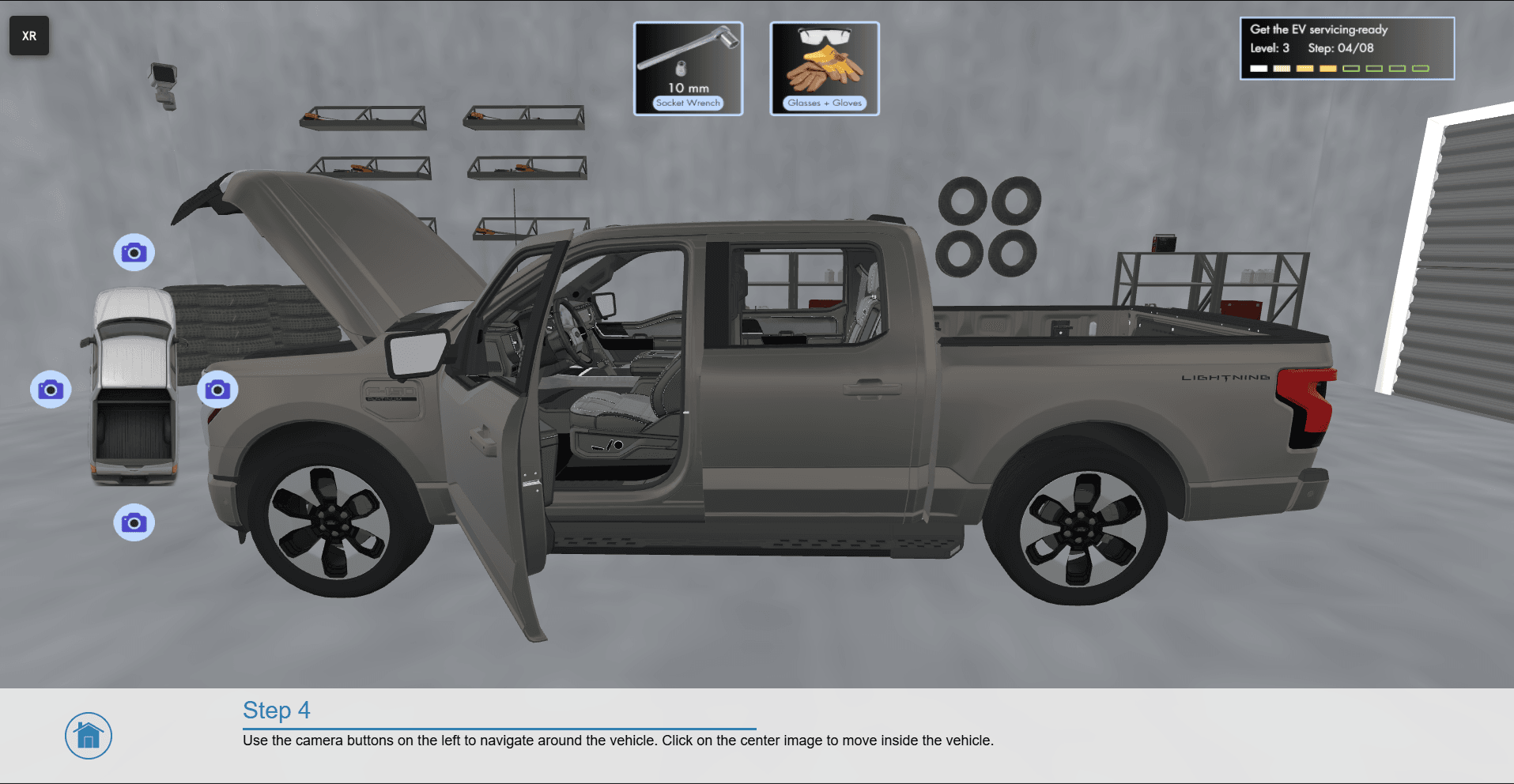
In our recent live event, we showcased how a complete immersive 3D EV repair and maintenance training module can be built in just 15 minutes using iQ3Connect.

The result: a fully functional, web-deployed experience accessible instantly across VR, AR, and desktop—without touching a game engine.


🌎 The Bigger Picture: Democratizing Immersive Learning


The iQ3Connect approach:

  • Expands access to XR training creation across non-technical teams.

  • Reduces costs by eliminating proprietary engines, plugins, and maintenance cycles.

  • Accelerates innovation by enabling rapid prototyping and deployment.

  • Future-proofs content, as browser-based delivery adapts seamlessly to new devices and standards.

For industries facing rapid change—like EV manufacturing, clean energy, and aerospace—this agility is critical to staying competitive. 

In addition, as demand for skilled workers continues to rise, immersive virtual training is proving to be a powerful lever for advancing both education and workforce readiness. For educators and policymakers committed to preparing students for meaningful, high-demand careers, these solutions represent a practical, scalable, and future-focused path forward (read our blog on rethinking career and technical education.)


🏁 Conclusion: Build Smarter, Not Harder

Game engines and their derivative products helped pioneer immersive learning, but they weren’t designed for scalable, everyday enterprise use. As organizations push to train faster, reach more learners, and lower costs, no-code web-based solutions like iQ3Connect offer a smarter path forward. 


See how simple immersive 3D training creation can be.

Accelerating XR Training Development with Gaussian Splatting and iQ3Connect

Background

Organizations face increasing pressure to deliver high-quality, scalable training that accurately represents complex equipment, facilities, and workflows. Yet the creation of 3D training content traditionally requires CAD models, laser scanning, or extensive manual modeling—processes that are slow, costly, and constrained by data availability.


Gaussian Splatting fundamentally changes this paradigm.


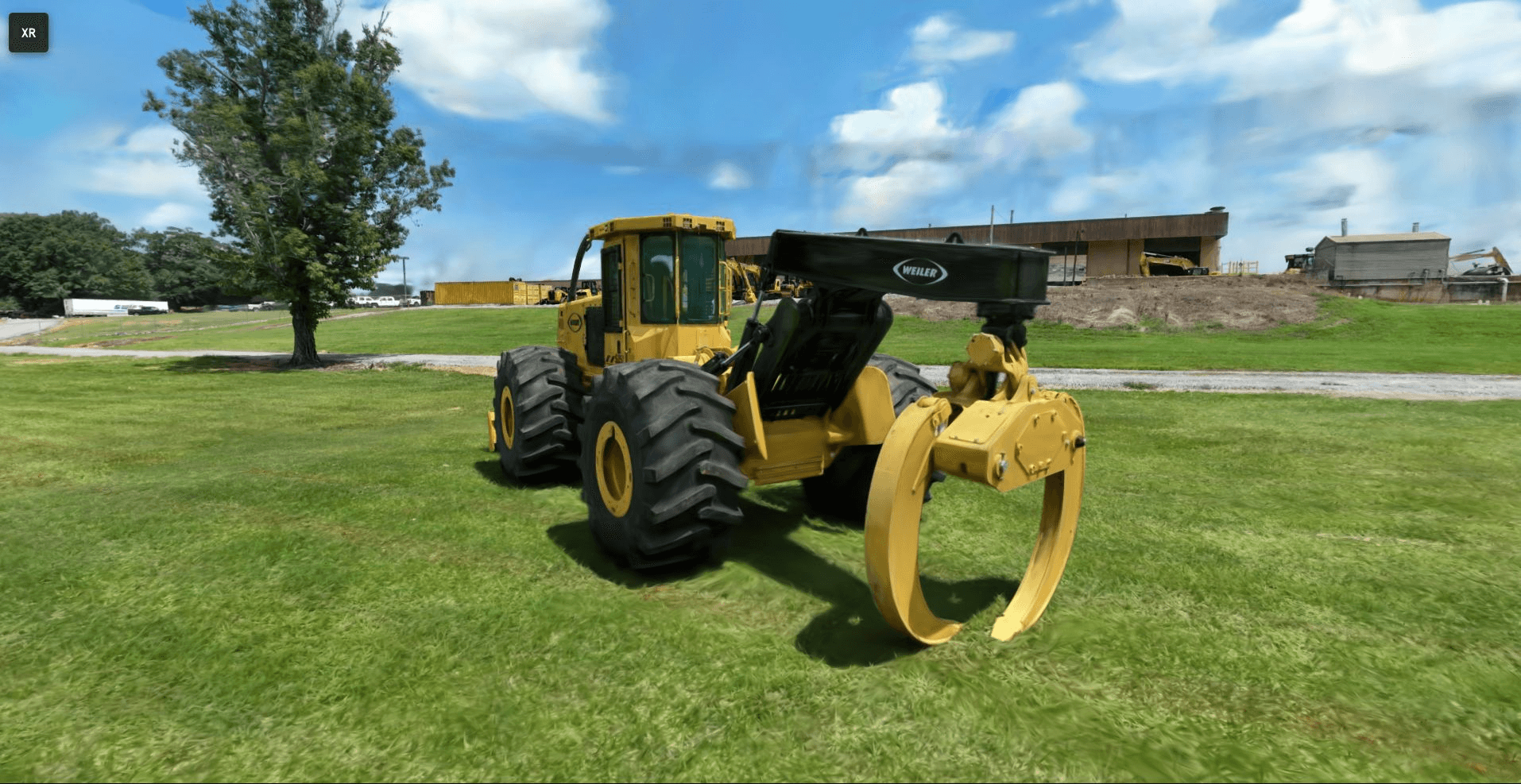
iQ3Connect now provides full support for Gaussian Splatting within our browser-based, enterprise XR platform, enabling creation of immersive training environments from simple photos or video. The result is a significant reduction in content development time, faster deployment of workforce training programs, and broader access to real-world operational knowledge.


What is Gaussian Splatting?

Gaussian Splatting is an advanced 3D reconstruction technique that converts standard images or video into a photorealistic, spatially accurate scene representation. Unlike mesh-based or voxel-based approaches, Gaussian Splats are computationally efficient, streamable, and exceptionally lightweight—making them ideal for real-time XR applications.

Key benefits include:

  • High fidelity reconstruction of real environments

  • Minimal capture requirements (standard mobile or video cameras)

  • Lower cost and faster turnaround compared to LiDAR or manual modeling

  • Immediate web and XR compatibility when processed in iQ3Connect

For training leaders, this capability unlocks rapid digitization of equipment, facilities, and processes—even when CAD data is unavailable or restricted.


Enterprise Training Advantages

✔ Accelerated Digitization of Equipment & Facilities

Capture real-world environments using only standard photography or video. No CAD, LiDAR, or modeling expertise required.


✔ Reduce Dependence on Engineering Data

Gaussian Splats provide a reliable alternative when CAD data is missing, outdated, proprietary, or too large for XR deployment.


✔ Integrate Multiple Data Modalities

iQ3Connect enables seamless combination of:

  • Gaussian Splats

  • CAD models

  • Point clouds (e.g., LAS, E57)

  • 360° images and videos

  • Operational documents (PDFs, videos, SOPs)

This creates a comprehensive, context-rich training environment.


✔ Streamlined Multi-Device Deployment

All Gaussian Splats processed in iQ3Connect are optimized for:

  • VR headsets

  • AR devices

  • Web browsers

  • Mobile and tablet

No local installation, plugins, or large downloads are required.


Common Tools for Creating Gaussian Splats Compatible with iQ3Connect

Several open-source and commercial tools generate splat formats (e.g., .ply, .splat) that can be imported directly into iQ3Connect. Common creation tools include:


1. Nerfstudio (with Gaussian Splatting pipelines)

An extensible framework that supports Gaussian Splat reconstruction from photo sets or video sequences.

  • Ideal for: High-quality reconstructions and research workflows

  • Output: .ply, .splat


2. Gaussian Splat Studio

A user-friendly application for generating splats from images or video with minimal setup.

  • Ideal for: Quick conversions and operational teams without ML expertise

  • Output: .splat


3. SplaTAM

A real-time SLAM-based Gaussian Splatting tool—excellent for capturing environments with a moving camera.

  • Ideal for: Handheld/mobile scanning, fast field capture

  • Output: .splat, .ply


4. Luma AI (NeRF-based with export options)

While primarily focused on NeRFs, Luma’s capture tools can be used as input for splat conversion workflows.

  • Ideal for: Smartphone-based capture with cloud processing


5. DotSplat and Mobile Splat Tools

Lightweight mobile pipelines emerging from open-source communities that export splat-compatible point clouds.


Here are three paid tools for creating 3D Gaussian splats (i.e., using the Gaussian Splatting technique) :


1. KIRI Engine

A mobile & web cloud-based 3D capture app that supports Gaussian splatting (“3DGS”) plus mesh export. Offers editing, masking, and export to formats like OBJ, GLTF, PLY. Paid subscription required for full 3DGS feature. 


2. Postshot

A desktop application (Windows) for processing captures into Gaussian splats locally (no cloud), with live preview/training, full control over data and export into 3D workflows. Best for users with suitable GPU. Paid version.


3. Splatware

Splatware: A cloud platform built for professionals and teams to generate, edit, animate, host and export Gaussian splatting 3D models, including hosting/sharing and marketplace options. Has tiered paid plans (Free → Pro → Enterprise).


All of the formats produced by these tools can be processed through the iQ3Connect 3D Importer and converted into XR-ready assets.


Technical Workflow: Importing Gaussian Splats into iQ3Connect

iQ3Connect streamlines the process of converting Gaussian Splats into optimized training-ready scenes.


1. Capture the Environment

Use photos, video, or drone footage. Ensure:

  • Adequate coverage around the subject

  • Consistent lighting where possible

  • Sufficient overlap between frames


2. Generate the Gaussian Splat

Process the captured media using one of the tools listed above. Export in .splat, .ksplat or .ply format.


3. Import into the iQ3Connect 3D Importer

Inside the platform:

  1. Open 3D Import

  2. Select Add Model

  3. Upload the Gaussian Splat file

The system automatically optimizes the file for real-time rendering and cross-device compatibility.


4. Convert to an XR-Ready Model

The splat file is can be converted into an XR-readu model in a single click. The XR-ready model can be used in iQ3Connect workspaces for training and multi-user XR collaboration.


5. Build a Rich Training Environment

Within the iQ3Connect Workspace, teams can combine the splat with:

  • Engineering CAD

  • LiDAR point clouds

  • Workflow steps and procedures

  • Media assets (PDF, video, 360° images)

  • Labels, markers, and hotspots

  • Guided training modules and assessments

This flexibility allows training developers to replicate a complete operational environment—not just a single asset.


6. Deploy to the Workforce

Publish your training or collaboration session and access it across:

  • VR and AR devices

  • PC and laptop browsers

  • Tablets and smartphones

All with no software installation.


Experience Gaussian Splats in iQ3Connect

Explore a live Gaussian Splat example in your browser. Use the WASD and mouse to navigate in the 3D space. Share the link with your colleagues to meet in realtime in the collaborative workspace.


👉 Live Experience


Looking Ahead

iQ3Connect will continue to expand support for Gaussian Splats, including advanced editing, annotation, and automated training authoring capabilities. Future examples will highlight real-world applications across manufacturing, energy, aerospace, pharmaceuticals, and other sectors requiring high-fidelity training environments.


Explore How Gaussian Splats Can Modernize Your Training Workflow


👉 Request a customized demo
👉 Evaluate integration with your existing content pipeline
👉 Begin creating XR training content in minutes—not weeks

Rethinking Career and Technical Education: Immersive Virtual Training as a Pathway to Workforce Readiness


Across the country, educators and policymakers are facing a fundamental question: How do we prepare students for the jobs of tomorrow when traditional classrooms and hands-on trade skills are both essential, yet increasingly out of reach for many?

A recent Marketplace.org article highlights this challenge, spotlighting a growing need for “career tech” programs that blend academic rigor with real-world, practical skills. Yet for many schools—especially in rural or under-resourced districts—the barriers to creating robust, hands-on training opportunities remain high.


Immersive Technology: Bridging the Gap

Immersive virtual training platforms like iQ3Connect are changing that equation. By leveraging digital environments, schools can deliver interactive 3D simulations, hands-on experiences, and industry collaboration—without the cost or logistical hurdles of physical labs.

This is not just about technology for technology’s sake. It’s about equity and opportunity: ensuring every learner, regardless of ZIP code, can access world-class technical education and real-world career pathways.


Policy in Action: The Sierra Space, CDLE, and iQ3Connect Partnership

A standout example is the partnership between Sierra Space, the Colorado Department of Labor and Employment (CDLE), and iQ3Connect. Through this collaboration, Colorado high school teachers and students are gaining access to aerospace industry training via immersive virtual modules. Teacher externships provide educators with direct industry experience, which they translate into curriculum, bringing current, relevant skills back to their students.

This initiative demonstrates:

  • Affordability and Scalability: No need for each school to invest in expensive equipment or labs—virtual solutions scale across districts and regions.

  • Industry-Relevant Curriculum: Direct input from employers ensures education stays aligned with evolving workforce needs.

  • Professional Development for Teachers: Externships empower teachers with up-to-date knowledge and skills, enriching classroom instruction.


Why This Matters for Policy and Practice

  • Expanding Access: Digital, device-agnostic training reaches students and teachers everywhere, supporting state and national equity goals.

  • Supporting Workforce Pipelines: Programs like this help build a diverse, competitive talent pool ready to meet the needs of 21st-century industries.

  • Enabling Data-Driven Improvement: Virtual platforms make it easier to track learning outcomes and program impact—key for continuous improvement and policy evaluation.

As demand for skilled workers continues to rise, immersive virtual training is proving to be a powerful lever for advancing both education and workforce readiness. For educators and policymakers committed to preparing students for meaningful, high-demand careers, these solutions represent a practical, scalable, and future-focused path forward.


Explore how the Sierra Space, CDLE, and iQ3Connect partnership is paving the way for innovative, equitable career education here.

Case Study: Immersive VR Digital Prototyping for Industrial Equipment Manufacturers

Overview

A leading industrial equipment manufacturer, specializing in engineered solutions for sectors like compressed air, vacuum, and assembly systems, sought to accelerate product development while reducing costly design iterations. With increasing pressure to deliver high-quality, customized solutions faster, the company leveraged iQ3Connect’s immersive XR platform to transform its digital prototyping workflow.


Industry Challenge

In industrial manufacturing, the stakes are high:

  • Complex assemblies and machinery require robust cross-functional reviews.

  • Physical prototyping is expensive and time-consuming.

  • Missed design issues can result in costly rework, delayed launches, and dissatisfied customers.

  • Effective collaboration between engineering, service, and production is often limited by geography and siloed processes.


Solution: iQ3Connect Immersive Prototyping

By adopting iQ3Connect’s XR platform, the manufacturer enabled its teams to:

  • Instantly upload and visualize 3D CAD assemblies (JT, STEP, etc.) in a shared, interactive XR environment.

  • Perform detailed assembly and service reviews virtually, including for large and heavy equipment that’s difficult to access physically.

  • Empower engineering, service, and manufacturing teams to collaborate in real time, whether on-site or remote, using either untethered or tethered VR headsets.

  • Rapidly identify and address design flaws early in the product lifecycle, before any physical prototype is produced.


Business Outcomes

  • Accelerated Time-to-Market:
    Teams quickly iterated on virtual prototypes, making design changes in days—not weeks—resulting in faster NPD (new product development) cycles.

  • Higher Design Quality and Fewer Errors:
    Immersive reviews allowed stakeholders to “walk through” complex machinery, ensuring issues are caught and resolved early.

  • Enhanced Collaboration:
    Cross-disciplinary teams—including engineering, production, and after-sales—could participate in reviews regardless of location, fostering alignment and knowledge transfer.

  • Cost Savings:
    Early digital detection of flaws significantly reduced the need for multiple physical prototypes and associated rework costs.

  • Easy Integration:
    No specialized coding or new CAD workflows—just upload and go, fully compatible with existing digital assets and IT environments.


Implementation Insights

  • The platform is browser-based and runs securely on company servers, supporting enterprise IT policies and data security requirements.

  • Compatible with industry-standard VR headsets, it works in both wireless and tethered modes for flexibility in factory or office settings.

  • The intuitive interface enabled fast onboarding for both engineering teams and field service reviewers.


Scaling Digital Innovation

After seeing measurable success in initial pilots—improved agility, deeper reviews, and tangible cost reductions—the company is expanding immersive prototyping across more projects and business units. The result? A more competitive, agile, and customer-responsive organization, ready to lead in the evolving industrial landscape.


Are you an industrial equipment manufacturer seeking to modernize your product development? Discover how iQ3Connect can help you accelerate innovation, reduce costs, and deliver higher-value solutions—contact us today for a tailored demo.

WebXR on iOS? How iQ3Connect Brings Web-Based Augmented Reality to iPads and iPhones

Despite the growing adoption of web-based XR experiences, Apple’s iOS ecosystem still lacks native support for WebXR, meaning immersive AR content built using WebXR simply doesn’t work on iOS. iQ3Connect is breaking through this limitation with a iOS browser app (iQ3Connect XR Viewer) that brings web-based AR to iPhones and iPads.

The Challenge: WebXR and iOS Don’t Mix — Yet

WebXR has emerged as a powerful standard for delivering immersive AR and VR content directly through web browsers to nearly any device, eliminating the need for dedicated apps and enabling cross-device XR experiences. But there’s a catch — Apple’s iOS does not currently support the WebXR Device API in Safari or any other browser on iPhones or iPads. This limitation means that immersive AR content built using WebXR simply doesn’t work natively on iOS, cutting off a large portion of mobile users from full browser-based XR experiences.


Solutions like 8th Wall and Mozilla’s WebXR Viewer are consumer focused or provide limited experimental support — falling short of delivering open, flexible, and web-based access to complex immersive (XR) content for enterprise training, work instructions, and collaboration.


The Innovation: iQ3Connect’s Custom WebXR Viewer for iOS

At iQ3Connect, we’ve developed a new solution to bypass this critical roadblock: a custom iOS app that acts as a WebXR-compatible browser, capable of rendering immersive AR experiences on iPhones and iPads.


Rather than relying on native WebXR support, our app uses ARKit under the hood to bring WebXR-style experiences to life. This means developers and enterprise users can now view and interact with spatial WebXR content in AR-mode on iOS — even though native WebXR support is absent. It’s a major step forward for accessibility and scalability of XR training, work instructions, and collaboration in the iOS ecosystem.


The Impact: Expanding the Reach of WebXR

This innovation marks a significant milestone in democratizing access to immersive training, work instructions, and collaboration tools. Enterprises using iQ3Connect’s platform can now:


  • Deploy spatial AR experiences across iOS devices without rewriting content or building native apps.

  • Reach users on any device — desktop, Android, iOS, or XR headset — with a single workflow.

  • Accelerate adoption of immersive training and work instructions by making deployment as simple as sending a link.

By solving a long-standing compatibility issue, iQ3Connect is helping move the industry closer to a truly device-agnostic, browser-based future for XR.

Unlock the power of seamless, app-free augmented reality—directly in your browser. Discover how iQ3Connect can transform your training, collaboration, or product demonstrations with immersive AR experiences, accessible anytime and anywhere.


Try iQ3Connect WebXR on your device today or book a live demo with our team to see the possibilities firsthand!

From Autodesk Inventor to XR Experiences: Simplifying 3D Collaboration and Immersive Training Creation with CAD data

In today’s manufacturing and engineering environments, teams rely heavily on detailed 3D models to bring ideas to life. Autodesk Inventor, a widely used tool for mechanical design and simulation, plays a crucial role in this workflow. But as teams grow more distributed and training needs accelerate, traditional CAD tools and file formats are no longer enough.


IQ3Connect bridges this gap by enabling seamless transformation of Autodesk Inventor designs into fully immersive XR experiences—without the need for custom programming or game engine development. Whether your goal is immersive training, design review, or real-time collaboration, IQ3Connect helps your team unlock the full value of your 3D data.


Eliminate Bottlenecks in CAD-to-XR Conversion

Historically, converting Inventor files into an XR environment required a complex and time-consuming process—exporting to intermediate formats, cleaning up geometry, importing into a game engine, and building custom interactions. This process often took weeks and required specialized 3D and XR development skills.


IQ3Connect eliminates this bottleneck by supporting direct import of Inventor-compatible files (such as STEP or neutral CAD formats) and offering a no-code XR experience creation platform. This allows engineers, designers, and trainers to bypass game engines entirely and get from concept to immersive training module in a fraction of the time.


Reuse Your Inventor Models for More Than Just Design

Your 3D models are more than just visual references—they’re assets that can drive collaboration, innovation, and learning.

With IQ3Connect, teams can:

  • Reuse Inventor models in virtual training simulations

  • Conduct design reviews in immersive environments

  • Enable multi-user collaboration across geographies

  • Scale training across roles and locations using web-based XR

Because IQ3Connect is web-native, there’s no need to install software or rely on high-end hardware. Training and collaboration sessions can be launched from a browser on desktops, laptops, or XR headsets.


Rapid, Scalable XR Training—Build with CAD No Code Required

IQ3Connect’s no-code interface allows subject matter experts to build immersive training workflows directly from their Inventor models. These workflows can include guided instruction, interactive tasks, and real-time assessments—making it easy to train technicians, operators, and engineers in a hands-on virtual environment.

Updates to Inventor designs? No problem. The platform allows you to easily update the underlying model while preserving your training logic and scene configuration.


One Platform for XR Design Reviews and Training

Whether you’re performing a design validation session or building scalable training for your global workforce, IQ3Connect provides one unified platform that leverages your Inventor models across use cases.

  • Reduce training costs by reusing CAD assets

  • Accelerate time-to-productivity with on-demand immersive learning

  • Improve team collaboration through shared, interactive 3D environments


Final Thoughts

Autodesk Inventor is a powerful tool for mechanical design—but its value doesn’t have to stop at the design phase. By connecting Inventor to IQ3Connect, you can extend the lifecycle of your 3D models into collaborative and immersive experiences that drive efficiency, learning, and innovation.


Transform your Inventor data into interactive XR experiences with IQ3Connect—no code, no delays, no compromise.

Build VR and AR Training with CAD Models—Streamline Your JT to XR Workflow

Streamlining VR & AR Training With JT File Support in iQ3Connect

iQ3Connect support for JT files significantly streamlines the process for bringing 3D CAD designs into immersive experiences, whether for real-time collaboration, training, and experience creation. By using this lightweight file format, the CAD-to-XR pipeline, from model export, to data transfer and processing, can be reduced from hours to minutes.


JT files can be exported from most CAD systems such as Siemens NX, Autodesk Inventor, PTC Creo, and Product Lifecycle Management systems such as Siemens Teamcenter.


Key Advantages of JT Files in the CAD-to-XR Workflow

1. Rapid, Automated CAD-to-XR Pipeline
With iQ3Connect’s JT file support, you can import large, complex CAD assemblies into virtual reality or augmented reality in just minutes. Benchmark results show:

  • JT files with 10 million polygons: Import into XR in under 30 seconds.

  • JT files with 100 million polygons: Ready for immersive training in under 10 minutes.

2. Custom Level of Detail for Every Use Case
iQ3Connect lets you define quality settings for each part or assembly. Whether you need high-fidelity visualization for engineering reviews or lightweight models for VR training, JT files support precise optimization.

3. Lightweight & Efficient Data Handling
JT files are specifically designed for efficient data sharing and management, making them perfect for large assemblies and distributed teams. They maintain essential manufacturing information and hierarchy while minimizing file size.

4. Versatile Visualization & Collaboration
Use JT files in iQ3Connect for high-accuracy engineering visualization or optimize for fast, interactive training experiences. The flexibility makes them valuable for manufacturing, automotive, aerospace, and beyond.


Why Use JT Files for VR and AR Training?

So, what are JT files? .JT (Jupiter Tessellation) is an openly-published ISO-standardized 3D data format for visualization and collaboration. JT files are used across industries such as manufacturing, automotive, and aerospace for data exchange, supplier collaboration, and long-term data retention. They encapsulate intricate geometric details and metadata, including geometry, color, and material properties, while maintaining a lightweight structure.


How iQ3Connect Simplifies JT to XR Training Creation

By supporting JT files, iQ3Connect enables:

  • One-click import of CAD models for VR and AR training or real-time collaboration

  • Faster CAD-to-XR conversion with minimal manual processing

  • Seamless sharing and review of complex engineering data in immersive environments


Start building your next immersive training or collaboration project with iQ3Connect and JT files—unlock new levels of efficiency, accuracy, and engagement for your team.


Upload your JT files and start creating XR experiences today!

Transforming Aerospace Development with iQ3Connect’s Immersive VR & AR Platform

Introduction

In the rapidly evolving aerospace industry, the ability to visualize, assess, and refine complex designs is crucial for successful product development. iQ3Connect’s immersive collaboration platform is redefining how aerospace companies approach design validation, stakeholder engagement, and maintenance planning. By leveraging virtual reality (VR), iQ3Connect enables teams to simulate and interact with 3D models, effectively bridging the gap between concept and reality.


A leading aerospace development organization, known for its commitment to innovation and precision engineering, has been actively involved in the design and development of multi-configuration aircraft. To maintain their competitive edge, they sought to streamline product walkthroughs, cockpit assessments, and maintenance evaluations — processes that were traditionally reliant on physical prototypes and static CAD models. This shift toward immersive virtual prototyping helped to reduce design cycle times, minimize costs, and enhance stakeholder engagement.


Background

Before adopting iQ3Connect’s virtual prototyping capabilities, the aerospace development company relied on conventional methods for product walkthroughs, cockpit assessments, and maintenance evaluations. These manual processes involved:

  • Building physical prototypes to showcase multiple aircraft configurations, leading to excessive material costs and extended lead times
  • Utilizing static CAD models and 2D drawings, limit interactive exploration and spatial 1:1 scale understanding
  • Repeated trial-and-error adjustments in cockpit design, consuming time and resources
  • Constructing physical mock-ups for maintenance access assessments, delaying design validation and increasing costs.


Challenges

  • Inconsistent Feedback: Traditional design methods made it challenging to gather comprehensive, real-time feedback from pilots, engineers, and stakeholders, resulting in miscommunication and potential design flaws.
  • Limited Visibility: Static CAD models did not accurately convey spatial arrangements, leading to overlooked ergonomic and accessibility issues.
  • High Costs and Time Delays: Developing multiple physical prototypes for different configurations significantly escalated project costs and extended timelines.
  • Inefficient Iteration: Design revisions required extensive physical rework, hindering the ability to make rapid adjustments based on stakeholder feedback.


Enhanced Benefit of iQ3Connect

The aerospace development company leveraged iQ3Connect to enhance their product development process across multiple areas, resulting in significant operational and cost efficiencies. By integrating VR into their workflow, they achieved the following:


  1. Product Walkthroughs:
  • Multi-Configuration Showcases: The company utilized iQ3Connect to load multiple CAD-based cabin configurations — from civilian aircraft to Medivac variants — within a single VR workspace, allowing stakeholders to switch between configurations seamlessly.
  • Real-Time Exploration: Stakeholders could virtually walk through aircraft cabins, assessing seating arrangements, cabin space utilization, and passenger comfort without the need for physical prototypes.
  • Interactive Visualization: Users could zoom in, rotate, and inspect intricate details like seat placements, emergency exits, and storage compartments, facilitating a more comprehensive understanding of the design.
  • Enhanced Decision-Making: The VR walkthroughs provided a more immersive experience, helping stakeholders identify potential design flaws early and make informed decisions without extensive physical rework.


  1. Cockpit Design Evaluation:
  • Realistic Pilot Simulation: The cockpit design assessments in iQ3 involved multiple evaluation sessions with both Air Force and civilian pilots, replicating the operational environment in VR.
  • Ergonomic Analysis: By aligning the pilot’s vision to a designated ‘eye point,’ pilots could assess control reachability, spatial arrangement, and visibility, allowing for precise adjustments to control placements.
  • Rapid Iterations: The VR platform allowed the design team to implement pilot feedback immediately, making multiple design iterations essentially free without constructing new physical mock-ups.
  • User Experience Testing: Pilots experienced the cockpit layout in VR, identifying discomfort points, visibility issues, and potential obstructions, resulting in refinements that would otherwise require extensive physical rework.


  1. Maintenance Evaluations:
  • Comprehensive Maintenance Reviews: The service engineering teams used iQ3 to conduct virtual assessments of maintenance access points, tool access, and component placements.
  • Detailed Feedback Integration: Maintenance personnel could virtually explore engine bays, control panels, and service points to identify potential access challenges and suggest design modifications.
  • Reduction in Physical Mock-ups: By resolving more than of the identified maintenance issues directly in the VR environment, the company minimized the need for costly physical prototypes.
  • Real-Time Collaboration: Maintenance engineers, designers, and stakeholders could collaborate in a shared VR space, discussing potential modifications and validating service procedures in real time.


Summary

iQ3Connect’s immersive platform has emerged as a game-changing tool in aerospace development, enabling the company to bridge the gap between conceptual design and practical application. By integrating VR into the workflow, the company has:

  • Enhanced design accuracy and stakeholder engagement
  • Reduced costs associated with physical prototypes and rework
  • Accelerated project timelines by streamlining the feedback loop

Ultimately, iQ3Connect empowers aerospace teams to innovate faster, reduce costs, and deliver higher-quality products with greater confidence and efficiency.

Beyond aerospace, industries such as automotive manufacturing, construction, industrial equipment design, and power generation can also leverage iQ3’s capabilities for interactive prototyping, maintenance training, and spatial assessments, further extending its impact across various sectors.


Learn how iQ3Connect can streamline design reviews, enhance team collaboration, and optimize training in aerospace—no matter where your teams are located.


Connect with us for a personalized demo and see how immersive 3D workspaces can transform your business.


Transforming Traditional Maintenance Training in Pharmaceutical Manufacturing with Digital Immersive Training

Background

In the competitive world of pharmaceutical manufacturing, plant reliability and operational safety depend on well-maintained equipment and a workforce that’s always ready. Yet for many companies, maintenance teams are a mix of in-house and contract staff, and high turnover can make it hard to deliver consistent, high-quality training.


The Challenge: Informal Training and High Turnover

At a major Indian pharmaceutical manufacturer, most equipment is maintained by on-site engineers. About 40% of the maintenance staff are contractors, and turnover rates are high. New hires are typically trained by senior engineers through hands-on, on-the-job learning.

While practical, this approach often means training quality can vary and is difficult to assess or standardize. There are no formal assessments or feedback loops, so managers have little insight into how well maintenance procedures are understood or followed.


A Digital Solution: Experiential Immersive Training

To address these challenges, the company began exploring digital experiential training as a scalable, modern alternative. After reviewing several platforms, the maintenance team selected iQ3Connect for its interactive, immersive approach—designed to deliver standardized, engaging training experiences.


As a first step, the focus was placed on vacuum pump maintenance—a routine and critical task, with around 300 pumps in operation across the plant. The team saw this as an ideal starting point for immersive training, with plans to expand to other core equipment like filters, dryers, agitators, and reactors. There is also interest in developing similar training for electrical maintenance tasks.

Implementation: From Real-World Procedure to Digital Module

The new digital training solution translates detailed maintenance procedures into an interactive VR module. Engineers learn and practice every step of the pump maintenance process in a risk-free virtual environment, receiving instant feedback and clear visual cues.


Benefits include:

  • Standardizing training content regardless of staff changes or instructor style,

  • Enabling faster onboarding of new employees,

  • Providing trackable assessments and actionable feedback,

  • Reducing errors and supporting compliance with safety protocols.


Next Steps and Organizational Impact

Encouraged by the success of the vacuum pump module, the company is planning to roll out immersive training for additional equipment, making advanced, feedback-driven learning a cornerstone of their maintenance organization.


This case highlights how digital experiential training can overcome traditional training barriers in pharmaceutical manufacturing—empowering maintenance teams, reducing operational risk, and supporting long-term business performance.


Interested in digitalizing your maintenance training? Contact iQ3Connect to learn how immersive, interactive solutions can help your organization achieve training excellence.

Icon

Form Submitted!

Thanks for submitting the form. An iQ3Connect representative will be reaching out to you shortly. In the meantime, please feel free to review some of our resources below.

Icon

Form Submitted!

Thanks for submitting the form. An iQ3Connect representative will be reaching out to you shortly. In the meantime, please feel free to review some of our resources below.

Icon

Form Submitted!

Thanks for submitting the form. An iQ3Connect representative will be reaching out to you shortly. In the meantime, please feel free to review some of our resources below.

Icon

Form Submitted!

Thanks for submitting the form. An iQ3Connect representative will be reaching out to you shortly. In the meantime, please feel free to review some of our resources below.