iQ3Connect Product Release v2026.1.1


Smarter Debugging. Seamless Language Translation. More Precise Authoring.
This release brings a new procedure tree view, multi-language authoring, and a dedicated debug tool to the iQ3Connect Training Editor, alongside improved object placement, AR support, and points of interest. Together, these updates make it easier for authors to build, translate, and troubleshoot immersive training experiences with greater precision and control.
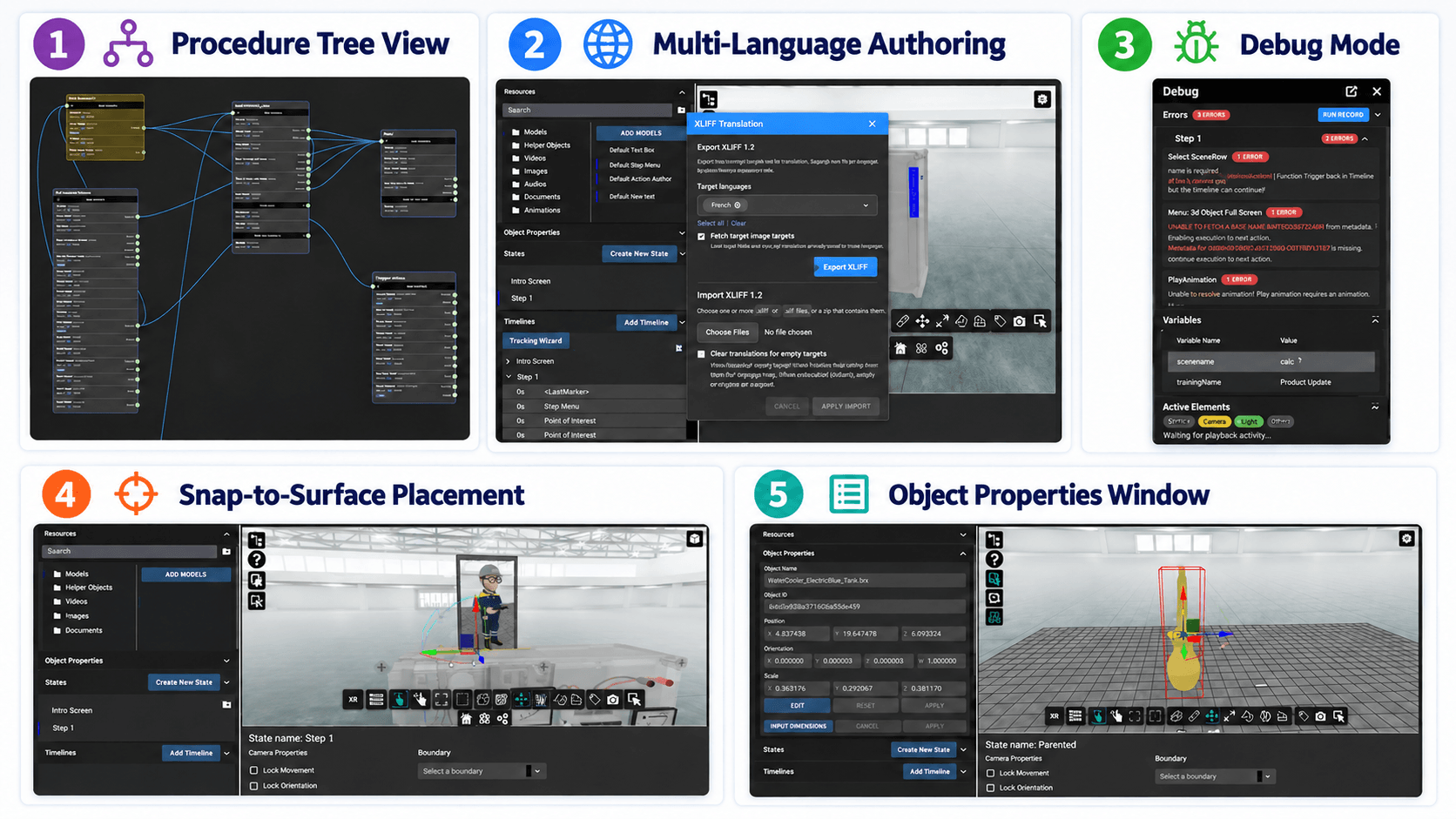
- Procedure Tree View (Beta): Authors can now visualize and edit training flow using a new procedure tree view, where each box represents a timeline. Nodes can be dragged and dropped and actions edited directly within the tree, offering a clearer, more intuitive way to structure training modules.
- Multi-Language Authoring: Authors can now export training content as an XLIFF file, translate it, and import it back into iQ3Connect. A new “add language selection” action automatically builds a language menu populated from the imported XLIFF files, letting end-users choose their preferred language before training begins.
- Debug Mode: A new debug tool gives authors direct visibility into what’s happening inside a training module before and during playback. The tool can be opened as a draggable panel within the editor or popped out into a separate browser window, and it surfaces missing definitions and runtime errors up front so issues can be caught before publishing. It also includes real-time tracking of variable values and active elements, making it much easier to trace down why a particular action or timeline isn’t behaving as expected. Alongside this, runtime training now plays through errors instead of stopping abruptly, keeping the experience running for end-users while authors are asked to report any unexpected halts so they can be investigated.
- Snap-to-Surface Object Placement: A new surface snapping feature aligns an object’s bounding box to the nearest surface hit point, making precise object placement faster and easier. Rotation snapping at every 90-degree increment is also available.
- Constrained Object Movement: Create more realistic and guided interactions by controlling how users can manipulate objects in XR. With Constrained Object Movement, authors can configure an object to:
- Move along a single linear axis
- Rotate around a single axis
- Move within a defined plane
Minimum and maximum values can be set for each movement type, giving authors precise control over the object’s permitted range of motion. When the object reaches the defined target position or rotation, it can automatically trigger the next timeline—allowing training experiences to progress based on successful task completion.
Available exclusively in XR, this feature is ideal for simulating real-world interactions such as operating a lever, rotating a valve, sliding a component, or positioning a part within a defined area. It enables more accurate, intuitive, and structured hands-on training while preventing unintended object movement.
- Improved AR Mode on Mobile Devices: AR alignment is now supported on both Android and iOS devices, with iOS requiring the iQ3Connect XR Viewer app, expanding reliable AR training delivery across mobile platforms.
- Points of Interest: A new points of interest action lets authors create 3D labels directly within iQ3Connect, without needing to build them separately or in Blender. Points of interest can be aligned to surface or attached to objects with leader lines, support dynamic variable updates, transparency and background color styling, and automatically show or hide based on the active timeline being authored.
- Object Properties Window: A new object properties window for multimedia, volumes, and full models displays object names, IDs, and world space bounding box positions, allowing authors to input exact dimensions and place objects precisely in world space.
- Parenting of Objects: Authors can now establish parent-child relationships between models and multimedia objects, so related elements—like an HMI and its attached label—move together. Child objects follow parent animations and move actions, with support extending across most animation types.
Request a demo to learn more!
Recent News
iQ3Connect Product Release v2025.5.12
iQ3Connect v2025.5.12 delivers greater control, clearer workflows, and richer AR experiences for immersive training creators. Explore event-based interactions, full authoring in AR, advanced movement controls, improved viewpoint management, and more intuitive selection behavior.
Read More
iQ3Connect Product Release v2025.5.9
iQ3Connect v2025.5.9 introduces powerful new tools to streamline training creation and delivery. Authors can now add and customize 3D helper objects, build splash screens, menus, and quizzes directly in the Training Editor, and dynamically scale objects with enhanced visual controls. Publishing is now fully integrated into the authoring workflow with one-click deployment, live URL updates, and resource protection—making it easier than ever to create, manage, and deliver immersive training experiences.
Read More
iQ3Connect Product Release v2025.5.4
iQ3Connect’s v2025.5.4 release makes immersive training faster to create, more realistic, and easier to access. Discover new support for Gaussian Splats, improved 3D rendering, simple code-based access, and smarter multimedia positioning across devices.
Read More