iQ3Connect Product Release v2025.5.4

Immersive Training Just Got Even More Powerful

We’re excited to announce several new enhancements to the iQ3Connect platform in our 2025.5.4 release—designed to make immersive training faster to create, more realistic to experience, and easier to access than ever.


  • Gaussian Splats for Immersive Training: iQ3Connect now supports Gaussian Splats, enabling lifelike 3D virtual environments captured from photos and/or videos. Splats can be easily shown, hidden, and scaled—unlocking rapid digitization for training and visualization.


  • Rendering Improvements: 3D models now display more realistically with enhanced lighting, reflections, and color balance—delivering clearer visuals and stronger spatial understanding across devices. 


  • Easy-Access Experiences: Joining an experience is now even simpler. In addition to unique URLs, every experience now includes a 4-digit access code—making it easy to join training sessions or collaboration spaces from any device with one-click or code-based entry.


  • Smarter Multimedia Positioning Across Devices: Multimedia objects now automatically optimize their positioning and behavior based on the device (and mode) being used — whether XR headsets, PCs, or tablet/mobile devices in 2D or AR mode. This ensures the best viewing experience on every device without authors needing to manually configure or maintain device-specific settings. 


These updates make it faster to bring real-world environments into immersive training, improve visual fidelity, and remove friction for learners and collaborators alike.


Request a demo to learn more!
iQ3Connect Product Release v2025.5.1

Faster, Simpler, and More Intuitive Training Creation

Version 2025.5.1 introduces major usability enhancements designed to make immersive training creation faster and more approachable—while still giving advanced users the flexibility they need. From a redesigned Training Editor to repeatable animations and cleaner trainee interfaces, this release makes it easier than ever to build polished, interactive 3D training experiences.


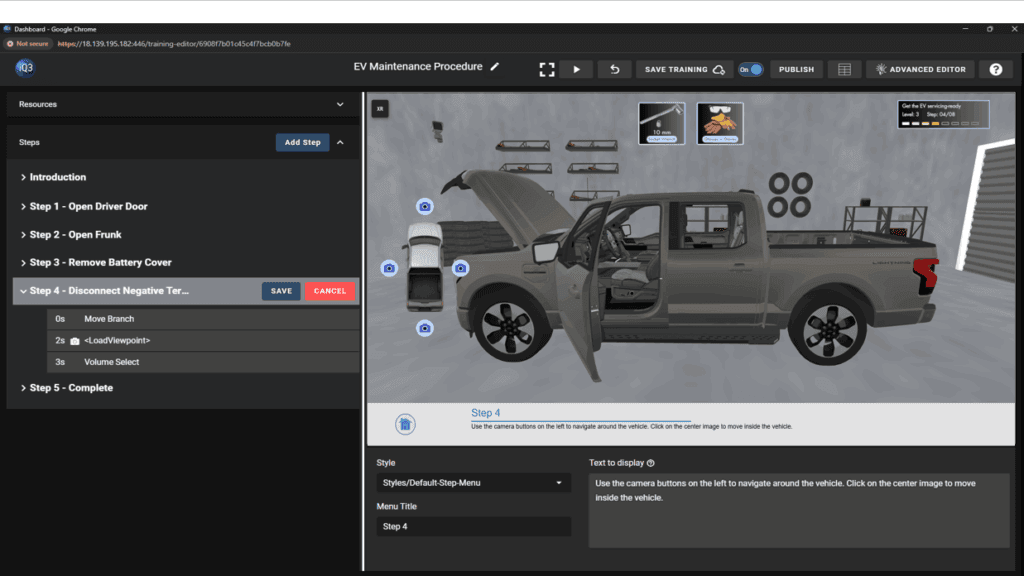
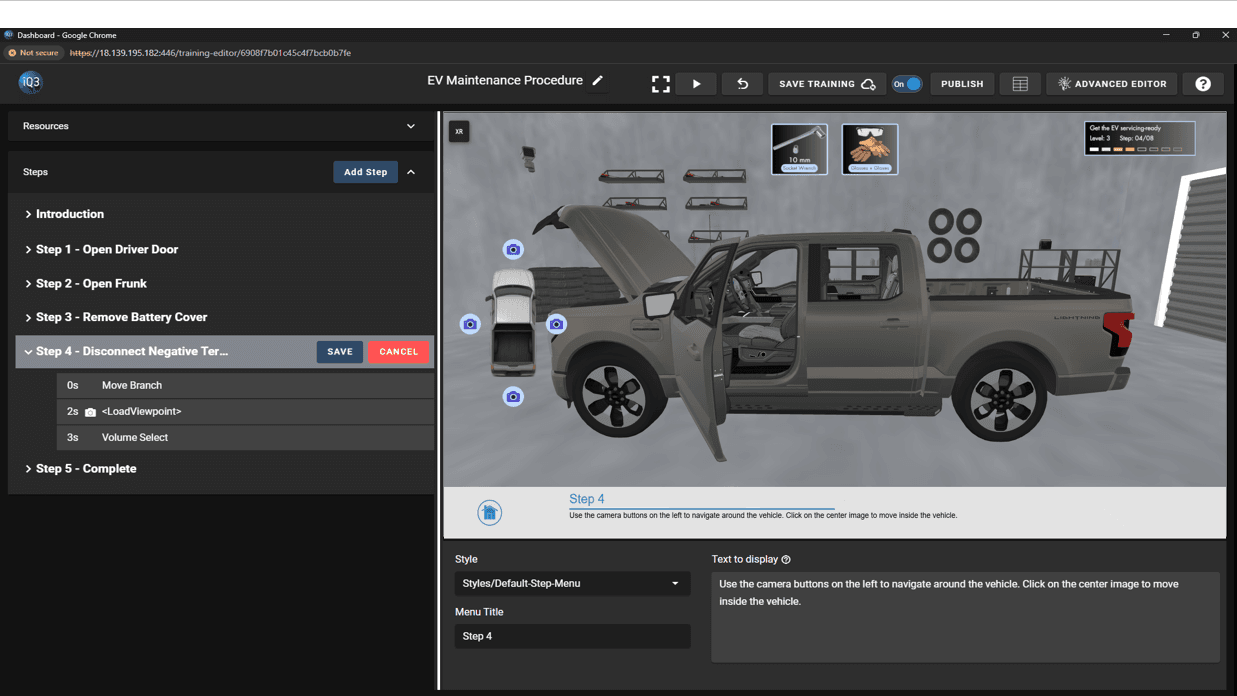
  • A New, Simplified Training Editor: Building training modules is now dramatically easier with our redesigned Training Editor. This new Editor introduces a streamlined, step-based workflow that helps authors create content quickly and confidently.

no code AI powered 3D training builder


  • Looping Animations: Animations can now be set to loop automatically, making it simple to create continuous motions such as rotating parts, indicator movements, or background activity. 


  • Easier Setup of Selection-Based Interactions: Defining selection-based interactions is now more intuitive. The updated interface for configuring selection triggers allows authors to easily view, organize, and adjust the conditions that move a trainee from one Step to the next. This makes it simpler to create interactive training flows based on object selections or other user actions.


Explore iQ3Connect v2025.5.1 to experience faster authoring, clearer interactions, and a more intuitive workflow for creating immersive 3D training.


Request a demo to learn more!
iQ3Connect Product Release v2025.4

Work Smarter, Train Faster

Version 2025.4 delivers major advancements in AR authoring, 3D rendering, and training usability—helping organizations create, align, and deploy immersive learning content faster than ever. From marker-based AR alignment to adaptive training behaviors and refined UI design, every improvement in this release is built to make immersive training more intuitive, more realistic, and more accessible across all devices.


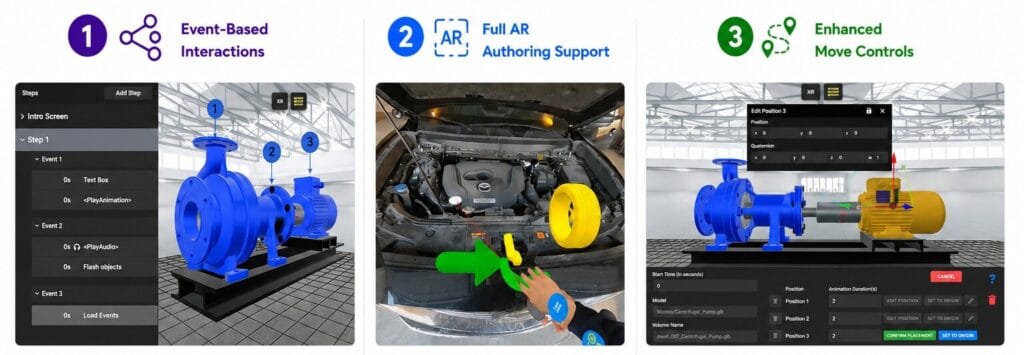
  • Build Directly in AR: Authoring immersive training modules in AR has never been easier. The entire setup can now be completed directly in AR-mode. This ensures virtual objects stay perfectly aligned with the physical world as you build, giving trainers a true “what-you-see-is-what-you-get” experience.


  • Simplified AR Alignment: Speed up setup and ensure perfect spatial alignment between real and virtual assets. With marker-based alignment (available for Android phones and tablets), authors can add and print virtual markers that sync the digital scene to the real world when scanned in AR-mode—enabling fast, accurate, and repeatable placement. Alternatively, with the new surface alignment mode, users can quickly anchor virtual 3D content to real-world surfaces such as desks, walls, or floors—making it simple for end-users to place and view content naturally across all XR-enabled devices.


  • Realistic Transparency and Rendering: Experience the most visually accurate version of iQ3Connect yet.

    • Transparent materials now render more accurately for realistic glass-like surfaces and artificial “x-ray” views

    • GLB model colors are more consistent and true-to-life.

    • Reflectivity and shading have been refined for higher realism across devices.

    These updates bring high quality visuals to every training module.


  • Device-Adaptive Training Behavior: Training content can now automatically adapt to the user’s device. Authors can control whether specific actions—like loading viewpoints or states—apply to all users or only those in 2D (non-XR) mode. This flexibility ensures the right experience for every device type, from desktop to headset.


  • Smarter Animation Authoring: Creating motion within 3D content is now more intuitive. Authors can define rotation pivots and axes visually by selecting points on a model or by selecting the center of a user-defined circle. The result: faster, more accurate, and more natural animations.


  • Enhanced Information Tags: Information Tags are now more flexible and expressive:

    • Optional “leader lines” visually connect tags to points on 3D models.

    • Tags can be repositioned and reset using an intuitive movement triad.

    • Tag states (open/closed, position, leader line, etc.) are saved within training states for consistent experiences.

    Together, these upgrades make information tagging clearer and more interactive.


Explore iQ3Connect v2025.4 today and see how the latest generation of AR authoring, visualization, and usability tools can accelerate your training transformation.


Request a demo to learn more!
iQ3Connect Product Release v2025.3

The latest release of iQ3Connect brings powerful upgrades that make immersive training and virtual collaboration even more intuitive, accessible, and impactful. With expanded AR support for iOS, Gaussian Splat import, new automation tools, and authoring improvements, iQ3Connect 2025.3 is designed to help organizations deliver spatial experiences faster, more easily, and with greater reach than ever before.


Training and Work Instructions


  • Web-Based Augmented Reality (AR) on iPhone and iPad: Web-based augmented reality (AR) is now available for users with iOS devices such as the iPhone and iPad. Just download the iQ3Connect WebXR Viewer from the App Store to experience your iQ3Connect training modules and virtual experiences in augmented reality. Standard web browsers on iOS devices (such as Safari or Chrome) can still view iQ3Connect content in 2D mode.


  • Support for Gaussian Splats: iQ3Connect now supports cutting-edge Gaussian Splat rendering, enabling you to visualize high-quality spatial data from .ply, .splat, or .ksplat files. Combine splats with point clouds, CAD, and multimedia to create rich, interactive, contextual environments for your training or engineering use case.


  • Smarter Training Creation with the Training Wizard: Quickly and automatically build structured virtual training modules in minutes. The new Training Wizard automatically transforms a series of steps into a fully functioning experience—complete with UI, navigation, and text instruction. You can launch immediately or fine-tune as needed. Pair with the new Text Editor to quickly review and edit your text-based content from a single streamlined UI. 


  • One-Stop Text Editing: Manage all instructional text from a single interface. The new Text Editing Mode lets authors view and edit training instructions in a streamlined table view, with real-time updates across your experience.


  • XR Step Menu for Headsets: Previously optimized for PCs, tablets, and phones, the new XR Step Menu now works seamlessly in AR and VR headsets. When a user is in immersive-mode (XR), the Step Menu will auto-position in the virtual 3D scene for optimum usability.


  • Instant Contextual Help: Need guidance while building your training? Contextual help icons now appear alongside each action property in the Training Editor, linking you directly to the relevant documentation—no need to search manually.


  • User Interface & Experience Enhancements:

    • UI elements now auto-scale and auto-position across devices and screen sizes

    • XR/AR/VR mode buttons are more visible and user-friendly

    • AR mode includes a better entry/exit experience and improved user positioning


  • Improved 3D Model Rendering: Rendering quality just got a major boost. GLB models now support emissive materials in addition to base color, metallic, roughness, and normals. Reflectivity is more realistic, and a new loading screen improves the end-user experience.


  • Better Performance for Complex Animations: Heavy models with advanced animations now run more smoothly—even on lower-end devices—thanks to optimization improvements across the animation engine.


  • Expanded Authoring Controls for Interactions: Authors can now assign actions to entire groups or model tree branches, making it easier to create interactive parts of an assembly. Additionally, new end-user interaction modes allow intuitive world manipulation and object movement.


  • Faster, Easier Training Authoring:

    • Up to 95% faster load times for states and training previews

    • Automatic unhighlighting and visibility control for edited objects

    • Fewer interruptions during editing with improved preview controls

    • Consistent style settings for buttons, text, and UI elements

    • Multimedia placement now adapts to all screen sizes with percentage-based scaling


Virtual Workspaces and Classrooms


  • Dynamic Scaling: Quickly resize 3D models directly within iQ3Connect Workspaces or the Training Editor. This makes content more adaptable for various environments and use cases.


  • Optimized Multi-User Collaboration: iQ3Connect Workspaces now scale more reliably, enabling up to 100 participants even over low-bandwidth connections, thanks to optimizations in server-client communication.


Enterprise Hub


  • Training Pack-n-Go: Export complete training modules—including all assets—for backup, transfer, or deployment across servers. This new “Pack-n-Go” feature simplifies content migration and supports offline storage for business continuity.


Let us know how these updates are helping you deliver smarter, faster, and more immersive training. To explore these new capabilities, contact us or start a free trial.

iQ3Connect Product Release v2025.2

iQ3Connect 2025.2 is here! We’re making XR training and work instruction creation easier, faster, and more powerful with new automation capabilities and AI/IoT integrations – so you can focus on what matters most: upskilling your workforce and improving operational efficiency. Key updates include Automated Experience Creation, a new Step Instruction Menu, and AI and IoT integration for work instructions, task verification, and digital twins. Explore the new capabilities of iQ3Connect 2025.2 below. 


Training and Work Instructions


  • Automated Experience Creation: Automatically create XR training and experiences using the new Training Wizard or quickly duplicate existing content and structure using the new copy/paste functionality. The Training Wizard will automatically create a fully functioning XR experience from 2 or more States (i.e. Scenes/Steps). The Training Wizard can also be used to automatically add the Next/Back navigation buttons to a step-by-step experience. The new copy/paste functionality enables the existing content (actions) or structure (timelines) to be quickly duplicated.  


  • Work Instruction Task Verification – AI + IoT Integration: Integrate artificial intelligence outputs and IoT sensor data into XR experiences. A new training action, External Signal Receiver, is now available which will listen for external data input and update the XR experience in real-time, either to report the data as-is or update the XR experience dynamically based on the content. These integrations are primarily targeted toward digital twins and work instruction task verification but can be applied to any use case.


  • Step Instruction Menu: The new Step Instruction Menu provides an improved UI that combines text information and menus/buttons. The Step Instruction Menu is completely customizable, from the colors, to the icons, to the number of buttons. The Step Instruction menu works in 2D, AR, and VR mode, whether mobile, tablet, PC, or HMD. 


  • XR Action – Time Tracking: Capture the time it takes to perform a step (or any arbitrary sequence) using the new Time Tracking actions. An unlimited number of durations can be tracked, with each time duration stored as a data point within the experience. This data can be automatically passed to an LMS system or easily exported to 3rd party tools.


  • XR Action – Flash Object: A new training action that will cause the defined object to flash. The flashing can be customized to change the visibility, transparency, or highlighting of the object.


  • Animations in GLB files: The ability to play animations embedded in GLB files has been expanded to include new end animation behaviors: reset, stop, loop. Reset will reset the animated objects back to their initial position/configuration, stop will leave the animated objects in their position/configuration as set at the end of the animation, while loop will cause the animation to play continuously. These settings are included as part of the GLB Animation action.


  • Augmented Reality – Virtual Hands: When entering AR-mode on a head-mounted display (HMD), the virtual hands will no longer be shown by default. Instead, the virtual menus and guides will now be mapped directly to the user’s physical hands, increasing the user’s visibility of the physical space. As part of this change, there is a new setting that can be used to turn back on the virtual hands if preferred and set that as the default behavior.


  • Text Box Behavior Improvements: Easily display text to end-users in 3D environments with our new Text Box behavior: Scene-Follow. When set to Scene-Follow mode, text boxes will appear in front of the user and will gradually follow them around the 3D environment. 


  • XR Performance Improvements: The lag and frame rate drops for animations and state transitions (i.e. LoadState actions) have been greatly reduced, leading to an overall smoother experience for the end-user.


  • Improved UI/UX for Experience Authoring: Some important elements of the experience creation process have been updated to provide an improved UI/UX. The Training Add Action menu has been reorganized to provide a more intuitive order, while the Create State and Add Timeline buttons have been moved to the relevant section header, eliminating the need to scroll to access these functions.


  • Reduced the Number and Frequency of the Movement Locked and Orientation Locked Messages: When an end-user is in an XR experience with the movement or orientation locked, they are automatically provided with a message when trying to move or rotate to inform them that their controls are locked. These messages were occurring too often which could disrupt the overall experience. Thus, the number and frequency of these messages has been greatly reduced.


Virtual Workspaces and Classrooms


  • Real-Time Digital Twins – AI + IoT Integration: Virtual workspaces can now be linked to data sources such as IoT sensors and AI output to create digital twins that are updated in real-time based on the real-world environment. These integrations are primarily targeted toward digital twins and work instruction task verification but can be applied to any use case.


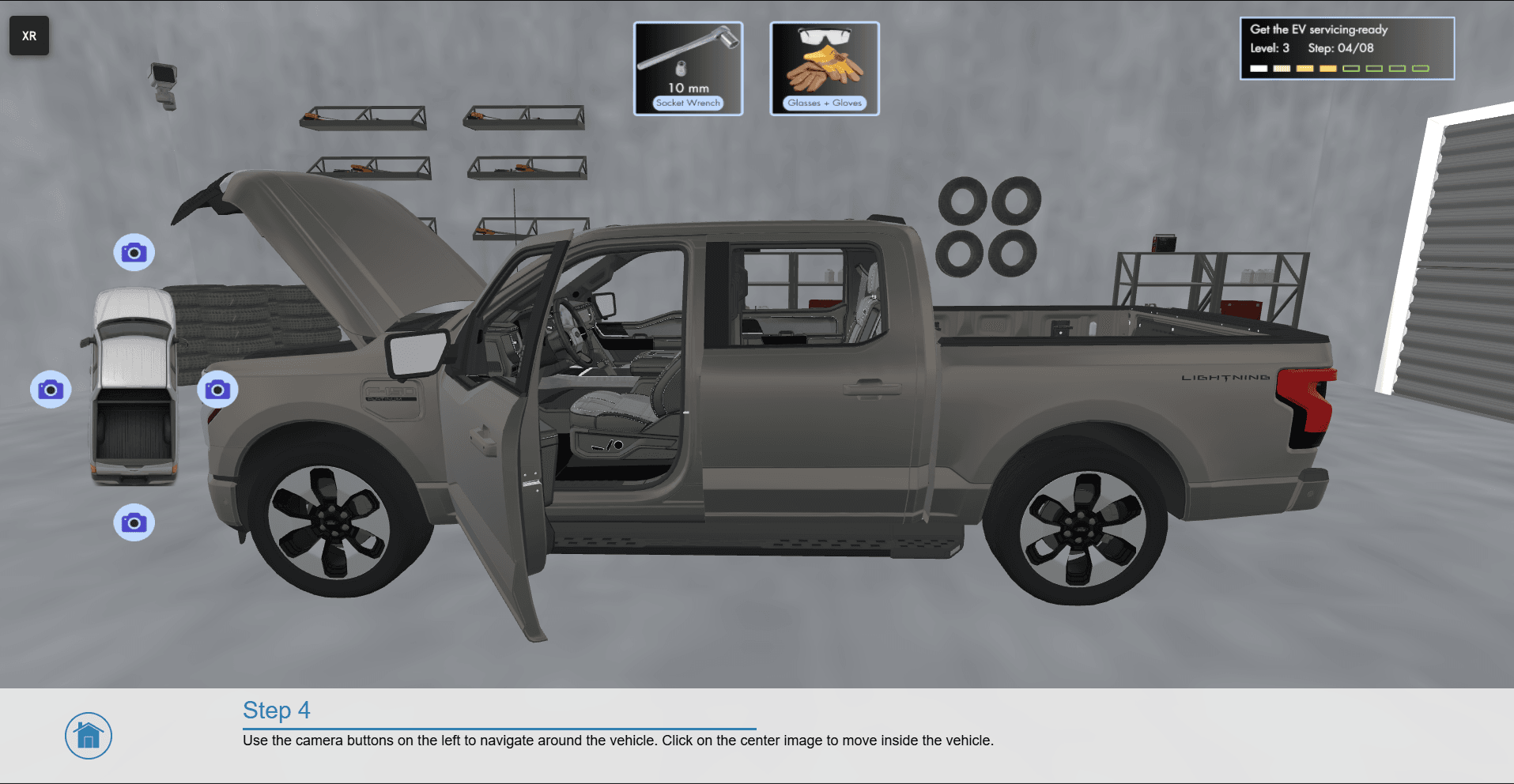
  • Save Scene in 2D Menu: The Save Scene button has been added to the standard 2D menu, making it more readily accessible. The Save Scene button can now be found in the upper left corner menu: My Content > Scenes & Sessions, see image below. Note: It can still be found in the XR menu as well.


Enterprise Hub


  • Launch Workspace Improvements: Launching a Workspace has been streamlined to provide easier access to XR models and Workspace settings. Launching a Workspace directly from the Project Home screen will now automatically select all of the available XR models in that Project. Alternatively, entire folders can now be selected from the XR Models page when launching a Workspace. Finally, a new quick settings menu will appear when launching a Workspace which provides options to change the workspace duration, public/private setting, and menu enabled/disabled.


  • Project Management and Default Template Editing: The ability to manage and administer Projects has been expanded. The Default Project Template can now be edited. Project Templates can now be used to update Projects (individually or in bulk) even after the Project has been created. The background environment can now be customized as part of the Project Template.


  • UI/UX Improvements for Inviting Users to Projects and Accessing Multimedia: The UI/UX for inviting users to Projects has been greatly improved, making it easier to quickly invite users and understand what invitations are still pending. Additionally, the Multimedia page is now the first page shown when the External Assets tab is selected.


  • Announcements Readability Improvement: When an announcement is selected, it is now fully expanded as a pop-up to improve readability

iQ3Connect Product Release v2025.1

iQ3Connect v2025.1 introduces a range of enhancements to expand the capabilities of web-based spatial training and work instructions, while improving the ease of XR content creation. Key updates include intuitive touch-based AR alignment, new training actions and triggers to improve interactivity, navigation and event-responsiveness, enhancements to tracking and logic to simplify performance monitoring and adaptive adjustments, and a streamlined UI/UX to make the training creation process even easier. Explore the new capabilities of iQ3Connect 2025.1 below. 


Training and Work Instructions


  • Touch-based AR Alignment – Head Mounted Displays (HMDs): Precise alignment of the virtual and physical environments can now be achieved through intuitive touch-based alignment with the controllers or hands. This new feature is compatible with any AR headset and only requires the end-user to touch 2 designated points in the physical environment to achieve alignment. This new process works without markers and can align to any arbitrary surface, regardless of size, shape, or material.


  • XR Action – Move Objects: A new training action has been added to the iQ3Connect Training Studio – Move Objects.  Creators of XR experiences can now visually define which virtual objects end-users can interact with and manipulate. Whitelist objects to quickly define a small number of interactive objects, leaving everything else locked-down, or blacklist objects to quickly lock down (make non-interactable) a few objects while making everything else interactable.


  • XR Action – Wayfinding: A new training action has been added to the iQ3Connect Training Studio – Wayfinding. The wayfinding action displays a virtual path toward a specific part/location in the environment, enabling end-users to more easily find the part or navigate to the desired location. Wayfinding can be paired with a User Position Trigger to automatically spawn events and actions once the user arrives at the destination.


  • XR Trigger – User Position: The new User Position Trigger can spawn actions and events based on the distance of the user to a designated object. Use this trigger to detect once the user has reached within a certain distance of the desired object or location. This trigger is available from the Wayfinding Action and can be used with or without wayfinding’s virtual path.


  • XR Trigger – Object-to-Object Proximity: The new Object-to-Object Proximity Trigger can spawn actions and events based on the distance between 2 virtual objects. Use this trigger to detect once the distance between 2 objects falls below a defined threshold distance, such as when verifying if an end-user has correctly placed a virtual part/tool/etc.


  • Tracking, Logic, and Variables: Our extensive tracking, logic, and variable system is now accessible directly from the Training Studio, meaning that scripting is no longer required. Our new visual interface makes it easy to record end-user outcomes (such as time to completion, incorrect steps, answers to questions, etc.) through a flexible tracking system. Define and change variables based on the metrics to be tracked and the performance of the end-user. Variables can be used in combination with logic statements to adjust the training dynamically to user performance and user selections.


  • Camera and Navigation Control: A creator’s ability to control the camera and navigation of the end-user has been drastically simplified with improvements to the Training Studio. Locking camera movement and/or orientation is now controlled through toggle switches in the State properties. Navigational boundaries (such as preventing end-users from walking through walls) can be set up visually, including the setup of stacked navigational rules (i.e. a user is allowed to move throughout a room but not through the objects within a room).


  • Download Training Data and Results: Training data and results can now be downloaded directly from the iQ3Connect Hub. In Workspace Templates > Past Workspaces, a new Download Training Results icon is available next to each past workspace.


  • Training Creation UI/UX Improvements: Some basic UI/UX improvements have been made to improve the efficiency of training creation. The training studio will now open automatically when a training is created, and the starting timeline is now premade. The action property viewer will automatically open when an action is added to a timeline. A new start/stop button will enable seamless transitions between authoring and training preview modes.


Virtual Workspaces and Classrooms


  • Improved Object Movement: Object movement has been drastically improved to provide for faster and more accurate movement of objects within the 3D environment. Improvements have been made for both PC/tablet and XR movement controls. Movement is now controlled via click-and-drag (replacing the old click-on to move, click-off to stop movement system) while a simple move speed modifier (such as holding the shift key or clicking on an on-screen button) allows users to seamlessly transition between fast movement and precision movement.


  • Improvements to Rejoining a Workspace: When attempting to join a meeting multiple times from the same account, preference will be given to the most recent connection, removing any older connections from the workspace. To prevent accidental or malicious removal, the older connection will be prompted to accept or reject the newer connection. Acceptance of new connection (or inactivity in responding to the prompt) will then remove the old connection and allow the new connection into the workspace.


  • Information Tag Status Indicator and Render Improvement: When viewing the list of information tags in a workspace, active info tags (tags already added to the workspace) will now be highlighted in the list to provide a visual indication of what’s in the workspace and what’s not. Info tag placement on 3D objects has also been improved, minimizing improper occlusion of the info tag to improve its visibility.


  • Default Environment Update: The default background environment for the iQ3Connect Workspace has been updated.


Enterprise Hub


  • Simplified Help Access: Accessing the iQ3Connect Knowledge Base has been greatly simplified. The help icon now redirects users to the knowledge base directly.


  • XR Model Organization – Grid View: Grid View (as opposed to the default list view) allows users to view an enlarged snapshot of all their XR models in an organized grid directly from the iQ3Connect Hub.

iQ3Connect Product Release v2024.5

Web-based spatial training and work instructions are now more accessible than ever with the release of iQ3Connect 2024.5. This latest update simplifies AR alignment, model optimization, animation authoring, and point cloud visualization. Discover the exciting new capabilities of iQ3Connect 2024.5 below. 


  • AR Alignment – Tablets and Mobile Devices – To make AR experiences and work instructions more user friendly, iQ3Connect has introduced automated physical/virtual alignment for tablets and mobile devices. With just two taps, your virtual and physical worlds are now aligned. No need to rely on markers and no need for flat surfaces. This new automated alignment works for objects of any size and shape.


  • Real-Time Model Simplification and Optimization – While our automated optimization often eliminates the need for manual simplification, we’ve now made it easier than ever when manual intervention is needed. Authors can simplify models dynamically while creating immersive experiences, ensuring critical decisions are made at the right time. Concerned about over-simplifying or losing essential details? With iQ3Connect’s robust versioning system, restoring previous versions of your model is seamless and instantaneous — empowering you to create without worry.


  • Author Animations with Alignment and Precision – New tools are available to make it even easier to create customized animations. A new alignment mechanism makes it easy to animate objects in relation to other objects, such as when needing to snap pieces together, while a new precision move mechanism allows for fine control of animations at millimeter accuracy.


  • Point Cloud Visualization – Import and view large point cloud datasets faster than ever. Our latest update drastically reduce the time it takes to process point cloud files while our optimized rendering allows any device to seamlessly view point clouds, even with billions of points.

Reimagine Workforce Training with iQ3Connect’s Release of XR Visual Authoring

It’s time to reimagine workforce training, and rethink the potential of immersive technology to capture and share corporate knowledge, build critical skills, and empower collaborative learning.


iQ3Connect is excited to announce a transformative solution for workforce development with our XR Training and Experience Creator – a visual (no-code) authoring environment for immersive training, work instructions, and knowledge capture. Accessible via a web-browser from any device whether it’s a laptop, tablet, phone, or AR/VR headset. Empower anyone on your team to create engaging XR experiences as quickly as a slide deck and more cost-effectively than video production. No XR, CAD, or visual design expertise required. 


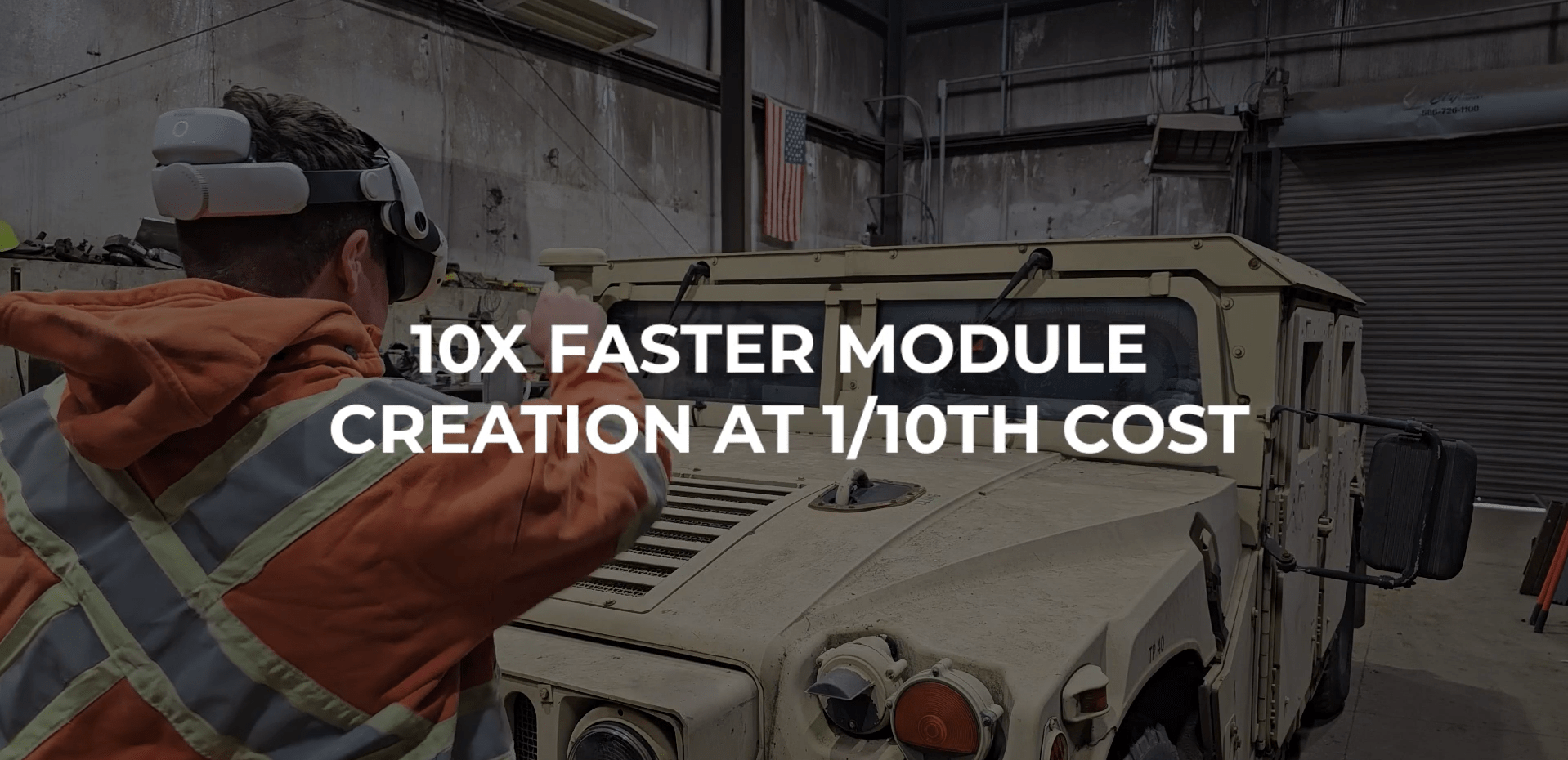
By removing the traditional barriers to XR adoption, iQ3Connect enables 10X faster content creation at 10% of the cost. 


Key Benefits:

  • No-Code Authoring: Visual tools to empower anyone to build interactive training without XR, CAD, or coding expertise.
  • Cost-Effective: Deploy immersive learning without the prohibitive costs of traditional XR technology, keeping your budget intact.
  • Scalable: Training can be accessed instantly from a web browser on any device, eliminating app downloads and traditional IT and hardware bottlenecks.
  • Fast & Easy Access: Skip the time-consuming travel and launch training programs faster than ever, ensuring your workforce remains up-to-date and competitive from any location


The Future of Training is Here


With the iQ3Connect XR Training and Experience Creator, you can finally unlock the full potential of XR technology. This platform makes it easier, faster, and more affordable to create immersive training experiences that drive engagement, retention, and performance.


Get Started Today!


Request a free-trial or schedule a demo.


The future of training is immersive, affordable, and scalable—thanks to iQ3Connect.

iQ3Connect Product Release v2024.4

iQ3Connect 2024.4 is streamlining the creation and management of XR training and work instructions. All you need is a web browser! This latest update enhances animation creation, integrates immersive 360-degree media, automates multimedia updates, and introduces new ways to build, visualize, and interact with XR scenes. Discover the exciting new capabilities of iQ3Connect 2024.4 below. 


  • Easy Animation Creation and Import – Seamlessly control animations embedded in .glb or .fbx models directly in iQ3 training and work instructions. Alternatively, with iQ3Connect’s Training Creator, authors can create their own animations on any 3D model in seconds. Animations can be applied, repeated, and reused infinitely across multiple different objects.


  • 360-Degree Images and Videos – Enhance your XR training and experiences with 360-degree images and videos. These immersive media options are perfect when 3D models aren’t available, or they can be combined with 3D models to create rich, interactive XR experiences.


  • Automated Content Management – iQ3Connect can now automatically import and update 2D and 3D content, even if included in XR training and experiences. Assets such as CAD models, videos, and PDFs will be automatically updated in the XR experience when their underlying data is updated, ensuring your XR experiences are always up-to-date.


  • Multimedia Movement and Anchoring – Now, multimedia objects can be moved and rotated using the same Coordinate System Controls as 3D objects. This unification simplifies object manipulation and enhances ease of use, allowing multimedia objects to be more accurately placed in the 3D virtual environment. Additionally, multimedia can be anchored to 3D objects to create realistic virtual scenes.


  • Dollhouse Mode – Traditionally, iQ3 Virtual Workspaces display 3D models at 1-to-1 scale providing users with a realistic experience. With the new Dollhouse mode, users can switch effortlessly between a 1-to-1 scale and a miniaturized version of the 3D model. This new mode provides an easy way to visualize large models, just like viewing scale models in reality.

iQ3Connect Product Release v2024.3

iQ3Connect 2024.3 is expanding the power and ease-of-use of web-based XR training and work instructions. In this latest update, we have drastically simplified the process of creating user interfaces whether completely customized or template-based, improved the capabilities for adopting AR work instructions based on the physical environment, and automated the export of training performance and metrics to other tools, such as LMS. Below are some additional details on the new features in iQ3Connect 2024.3. 


  • Physical Measurement and Data Capture for AR – During AR training or AR work instruction, users can input physical measurements and data into the virtual experience. These inputs can be stored, manipulated, and reported for future use for user feedback, data analytics, and more. These inputs can also be used to control the AR experience such as when additional steps must be taken if measurements aren’t within nominal values.


  • Easy, Customizable User Interfaces – Simplify the process of user interface design for XR training and collaboration. Import multimedia such as images, pdfs, or videos to create buttons and interactive objects in seconds. Leverage style templates to ensure consistent look and feel for text boxes and buttons. 


  • Quick and Feature-rich Labels for Providing Text, Audio, and Web Resources – iQ3Connect training modules and experiences now support in-built labels and descriptions that can be created and customized in seconds. These labels (also called Information Tags) can be attached to virtual objects and display text, play audio files, and/or provide URL links, offering an easy and quick method for displaying textual information, audio narration, and/or web-based resources.


  • Automated Export of Training Results and Metrics – Easily export the results and metrics from an iQ3Connect XR training or experience to any web-based tool using the post-message framework.


  • Wayfinding and Positional Triggers – Guide users to the object, task, or location of interest with virtual waypoints or arrows. Trigger actions in the experience based on the user’s position and/or orientation.


  • Capture Alphanumeric Input during an XR Training or Experience – Users can now be prompted to input text and numbers during an XR training or experience. This provides training authors with the capability to evaluate trainee performance with open-ended questions and capture open-ended feedback from end-users directly from within the XR experience.

Icon

Form Submitted!

Thanks for submitting the form. An iQ3Connect representative will be reaching out to you shortly. In the meantime, please feel free to review some of our resources below.

Icon

Form Submitted!

Thanks for submitting the form. An iQ3Connect representative will be reaching out to you shortly. In the meantime, please feel free to review some of our resources below.

Icon

Form Submitted!

Thanks for submitting the form. An iQ3Connect representative will be reaching out to you shortly. In the meantime, please feel free to review some of our resources below.

Icon

Form Submitted!

Thanks for submitting the form. An iQ3Connect representative will be reaching out to you shortly. In the meantime, please feel free to review some of our resources below.